how-to
Fast Turnaround for 3D Prototypes: A 2026 Guide

Last Updated: October 8, 2026
What Determines Fast Turnaround for 3D Prototypes
Fast turnaround for 3D prototypes depends on several interconnected factors that work together to speed up your project timeline. The core drivers are technology choice, file readiness, design complexity, and service capacity. Understanding these elements helps you make informed decisions about which approach fits your timeline.
Technology matters most. Different printing methods have different speeds. FDM printing typically takes longer per part but can run overnight. Resin printing delivers faster per-unit times but requires post-processing. Metal printing is the slowest overall but produces the strongest parts.
File quality affects turnaround significantly. A clean, well-prepared CAD file moves through production immediately. A file that needs corrections or redesign adds days to your project. This is where many teams lose time without realising it.
Design complexity directly impacts speed. Simple geometric shapes print faster than intricate features with fine details. Overhangs, thin walls, and complex internal geometry require careful support design and longer print times. The simplest designs often deliver the fastest results without sacrificing function.
Service provider capacity matters too. A shop with multiple machines can absorb rush jobs. A shop running at full capacity may add weeks to your timeline. Checking availability upfront prevents surprises.
3D Printing Prototype Turnaround Time by Technology
Each printing technology delivers different speed profiles. Knowing what to expect helps you choose the right method for your deadline.
FDM Printing Speed and Lead Times
FDM (Fused Deposition Modelling) is the most common rapid prototyping method. Print times range from a few hours for small parts to 24+ hours for large objects. The actual speed depends on layer height, infill density, and part size.
Layer height is the critical variable. Thicker layers (0.2mm) print faster than thin layers (0.1mm), but sacrifice detail. Most prototypes use 0.15-0.2mm layers as a balance. A small bracket might print in 4 hours at 0.2mm layer height, while the same part at 0.1mm takes 8 hours.
Infill density also drives speed. Solid parts (100% infill) take much longer than hollow parts (20% infill). Most prototypes use 15-20% infill for strength without wasting material and time. This simple choice can cut print time by half.
Post-processing adds time after printing. Support removal, sanding, and finishing typically add 2-4 hours to your total timeline. Plan for this when calculating delivery dates.
FDM works well for functional prototypes, mechanical testing, and parts that don't require high surface finish. Lead times from file submission to finished part typically range from 2-5 business days depending on queue and complexity.
Resin Printing for Rapid Delivery
Resin printing (SLA or DLP) delivers the fastest per-part print times in the rapid prototyping world. A detailed resin part prints in 2-6 hours depending on size and layer thickness.
The speed advantage comes from how resin works. The entire layer cures at once, not line by line like FDM. Larger parts don't take proportionally longer. A 100mm tall part prints nearly as fast as a 50mm part.
Detail is the resin printing strength. Resin captures fine features, smooth surfaces, and complex geometry without support issues that plague FDM. Your prototype looks and feels professional straight from the printer.
Post-processing is more involved than FDM. Resin parts require washing in solvent, drying, and UV curing. Some finishes need sanding or coating. Total post-processing time is 3-6 hours per batch. However, batching multiple small parts makes this efficient.
Resin printing excels for display models, detailed prototypes, and parts requiring excellent surface finish. Turnaround from file to finished part is typically 1-3 business days. For rush jobs, resin often beats FDM because individual part print time is so short.
Metal Printing Timescales
Metal 3D printing (DMLS, SLM, or binder jetting) produces the strongest prototypes but takes the longest. Print times for metal parts range from 8 hours to 48+ hours depending on size and design.
Metal printing requires careful support design and post-processing. Supports must be stronger than resin or FDM supports because metal is heavy and stress is real. Support design and removal can take as long as printing itself.
Heat treatment is mandatory for most metal prints. Parts must be stress-relieved or fully heat-treated to achieve specified properties. This adds 1-5 days depending on the material and treatment required.
Metal printing is the right choice when you need actual strength testing, functional metal parts, or components that operate at temperature. Turnaround is typically 5-10 business days from file submission to finished, heat-treated part.
FDM vs Resin Prototyping: Which Is Faster
The choice between FDM and resin depends on your specific requirements, not just speed. Both can deliver fast turnaround for 3D prototypes, but they serve different needs.
FDM is faster for:
Functional testing and mechanical parts
Large parts that exceed resin printer build platforms
Parts that need to be strong and durable
Multiple iterations where cost matters
Resin is faster for:
Detailed, cosmetic prototypes
Small to medium parts
Parts requiring excellent surface finish
High-precision features and fine details
In practice, resin wins on per-unit print time. A small detailed part prints in 2-3 hours on resin versus 6-10 hours on FDM. But FDM wins on overall project speed for large parts or functional prototypes because it requires less post-processing.
The real difference emerges when you factor in your actual deadline and part requirements. A cosmetic prototype for a client presentation favours resin. A mechanical prototype for stress testing favours FDM. Kreative3D helps you navigate this choice by matching technology to your specific goals, not just raw speed.
Pro Tip Ask your service provider what post-processing time they include in their quoted turnaround. Print time is only half the story, finishing work often takes as long as printing.
CAD File Preparation for 3D Printing Speed
A clean CAD file is your fastest path to finished parts. Poor file quality adds days to your project through corrections, redesigns, and reprints.
Start with a file format your service provider accepts. STL and STEP files are industry standard. Confirm the format before you spend time exporting. A wrong format means re-export and delay.
Check for common CAD errors that slow production:
Thin walls below the printer's minimum thickness (usually 0.8-1mm for FDM, 0.6mm for resin)
Unsupported overhangs that require extensive support structure
Gaps or non-manifold geometry that prevents slicing
Unrealistic tolerances that can't be achieved by the printing process
Missing or ambiguous dimensions for critical features
Scale and orientation matter. Orienting a part to minimize supports can cut print time by 30-50%. Nesting multiple small parts on one build platform saves time and material. A skilled CAD person can optimise these details in minutes, but only if the file is ready.
Provide clear specifications with your file. State the required material, surface finish, and tolerances. If you need post-processing (painting, assembly, etc.), mention it upfront. Ambiguity forces back-and-forth emails that delay production.
We offer instant online quoting because our system reads your CAD file, checks for printability, and generates a quote automatically. This removes guesswork and accelerates your timeline from quote to production.
Watch Out A file that looks fine in your CAD software might have hidden errors that prevent slicing. Always request a pre-print review from your service provider before committing to a rush order.
Understanding 3D Printing Prototype Cost and Timeline Trade-offs
Speed and cost are inversely related in 3D printing. The fastest options cost more. Understanding the trade-offs helps you make smart choices.
Rush fees are common in the industry. Pushing a job to the front of the queue costs extra. Some shops charge 25-50% premiums for 24-hour turnaround. Budget accordingly if speed is critical.
Technology choice affects both cost and speed. Resin printing is typically cheaper per part than FDM for small detailed items, but FDM is cheaper for large functional parts. Metal printing is the most expensive and slowest option but delivers unmatched strength.
Design changes mid-project destroy timelines. A revision request after printing has started means scrapping the part and starting over. Freeze your design before submitting for production. If changes are essential, accept that your timeline will slip.
Batch size influences per-unit speed. Printing 10 identical parts on one build platform is faster per part than printing one part. If you need multiple copies, consolidate your order.
Material availability can delay projects. Some specialty materials have longer lead times. Standard materials (black resin, natural nylon for FDM, standard stainless steel) are always in stock.
Key Takeaway The fastest fast turnaround for 3D prototypes comes from combining three factors: a clean CAD file, a simple design, and the right technology choice for your part requirements.
Practical Steps to Accelerate Your Prototype Delivery
These concrete steps speed up your project from concept to finished part.
Step 1: Prepare Your Design Start with a final, reviewed CAD file. Remove any unnecessary complexity. Check that wall thickness meets minimum requirements for your chosen technology.
Step 2: Choose Your Technology Decide between FDM, resin, or metal based on your part's function, not just speed. A functional prototype needs FDM strength. A cosmetic prototype needs resin detail.
Step 3: Get an Instant Quote Submit your CAD file to a service provider that offers automated quoting. You should receive a price and timeline within minutes, not days.
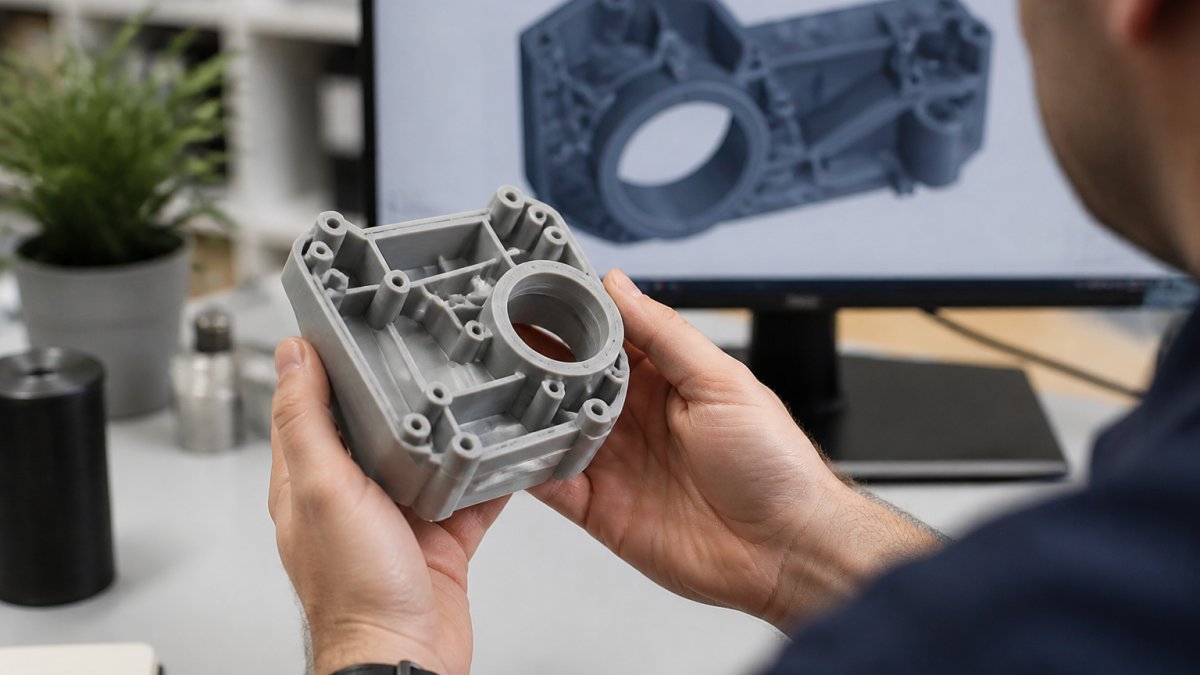
Step 4: Confirm Availability Check that your service provider can meet your deadline before placing the order. A shop at full capacity may add weeks to your timeline.
Step 5: Provide Clear Specifications State the material, finish, and tolerances you need. If post-processing is required (painting, assembly, coating), mention it. Clear specs prevent misunderstandings that force reprints.
Step 6: Accept the Quote and Production Timeline Once you've committed, don't request changes. Changes mid-print mean scrapping the part and starting over. If revisions are essential, accept that your deadline will slip.
Step 7: Review the Finished Part When your prototype arrives, inspect it immediately. Check dimensions, surface finish, and functionality. Document any issues so your next iteration can address them.
These seven steps compress your timeline by eliminating delays caused by unclear requirements, wrong material choices, and design revisions mid-production.
Conclusion
Fast turnaround for 3D prototypes is achievable when you understand the technology, prepare your files properly, and choose the right service partner. FDM, resin, and metal printing each excel in different scenarios. The fastest approach isn't always the best approach, it's the approach that matches your part's actual requirements.
Kreative3D specialises in rapid prototyping with instant online quoting, expert CAD and reverse engineering services, and the capability to deliver in FDM, resin, and metal. Our streamlined online process removes delays and gets your prototype from concept to finished part. Whether you need a functional mechanical prototype, a detailed display model, or a production-ready metal component, we match technology to your timeline and requirements.
Get an instant quote today and see how fast we can deliver your prototype.
Frequently Asked Questions
How quickly can a 3D prototype actually be made?
Turnaround depends on the technology and complexity. FDM printing typically takes 2-5 days for straightforward parts, while resin prototypes can be ready in 1-3 days. Metal prints take longer, usually 7-14 days. Simple geometries print faster than intricate designs. An instant online quote will give you exact timescales for your specific project.
What's the fastest 3D printing method for prototypes?
Resin printing is generally the fastest for detailed prototypes, delivering results in 24-48 hours for most jobs. FDM runs a close second for larger or less detailed parts. The 'fastest' choice depends on your geometry, material needs, and finish requirements. Discuss your deadline with your provider to match the right technology to your timeline.
How can I prepare my CAD file to avoid delays in 3D printing?
Check that your file is watertight with no gaps or intersecting surfaces, as these cause print failures and rework. Ensure wall thickness meets minimum requirements for your chosen material. Remove unnecessary internal geometry. Export in a standard format like STL or STEP. Test your file using free validation tools before submission. A properly prepared file prints first time, eliminating costly revisions.
Does choosing faster 3D printing prototype turnaround significantly increase cost?
Cost depends on material, size, complexity, and quantity, not speed alone. Express or priority delivery may add a surcharge, but choosing the right technology often costs less than upgrading to a premium tier. Small batches and simple geometries keep costs reasonable even with tight deadlines. Request a detailed quote to see the actual cost impact of your timeline.
Ready to accelerate your project? Submit your CAD file to Kreative3D for an instant quote. We'll confirm your timeline, material, and finish specifications, and get your prototype into production immediately. No hidden costs, no surprises, just fast, professional delivery.